

From Remote Support to Spatial Support
Spatial Support is a new form of remote support in which experts guide on-site employees with visual instructions in their physical work environment. Through a standalone VR headset, the employee remains handsfree while instructions become directly visible at the exact point where action is needed.
Instead of only watching via video or explaining through audio, an expert can directly indicate where someone needs to look, which component requires attention and which action must be carried out. This means remote support is not only shared verbally or visually, but directly connected to the real environment where the work takes place.
This matters because traditional remote support in complex situations often depends too heavily on interpretation. An expert can explain something, but the on-site employee still needs to understand which component is being referred to, what the instruction applies to and how it should be carried out in practice. In technical support, maintenance, inspection, installation or training, this can lead to delays, miscommunication and errors.
Spatial Support makes remote support visual, spatial and directly applicable. The employee works in their own work environment, while instructions are not given separately from the situation, but appear within the context of the work. This changes remote support from watching and explaining into direct guidance in practice. Less interpretation, fewer errors and better use of scarce expertise.
How does Spatial Support work in practice?
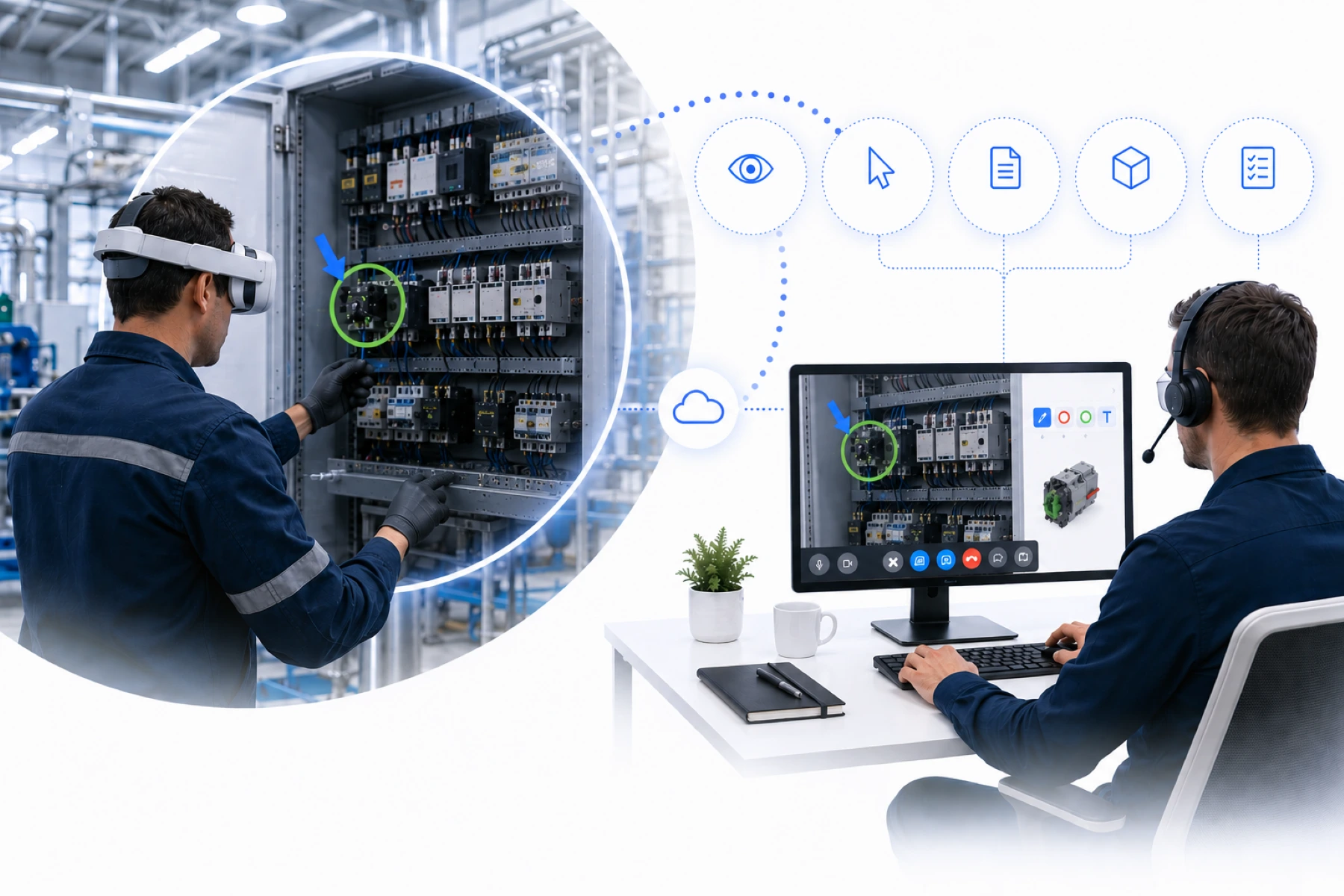
Spatial Support works by connecting the physical work environment of the on-site employee live with a remote expert. The employee wears a standalone VR headset and remains handsfree while working in their own environment. The expert watches live and can add support from a dashboard to what the employee is seeing at that moment.
That support is not limited to pointing things out. The expert can place visual markers, share technical diagrams, show checklists, make documentation available, place 3D models in the employee’s field of view and use spatial information to assess situations more effectively. This creates a support layer that directly aligns with the real context in which the work takes place.
When the expert wants to point something out, they click with the mouse directly on the object or location they see in the live video stream. A pointer, circle or other visual marker then appears in the VR headset exactly at that location. This marker remains visible in the correct position in the environment, even when the employee moves. The expert also sees in the dashboard where the marker has been placed, so both parties are looking at the same situation with the same visual context.
In practice, an expert can mark a component on an installation, share a technical diagram in the employee’s field of view or place a 3D model to show where a component belongs. During inspections, maintenance, installation or training, information is no longer discussed separately, but made visible at the moment and in the place where it is needed.
That makes Spatial Support fundamentally different from traditional remote support. It is not just about watching or talking, but about combining live video, visual instructions, shared information and spatial context. The on-site employee has to interpret less and can act faster, more confidently and more accurately.
This makes remote support not only clearer, but also more practical. The expert brings their knowledge into the employee’s work environment without being physically present.
Why watching along is not enough for complex support
Traditional remote support works well as long as the situation is simple. An expert watches along, gives verbal instructions and helps the on-site employee move forward step by step. For many standard questions, that is enough.
But complex support creates a different challenge. The expert may be able to see what is happening, but still has to explain where the employee should look, which component is being referred to and which action is needed. The employee then has to translate that explanation into the physical situation in front of them.
That is often where things go wrong. Not because the connection is poor, but because interpretation creates room for doubt, delay and errors. Especially in technical installations, maintenance, inspections, training or time-critical situations, one misunderstood instruction can directly affect the quality of execution.
Spatial Support reduces that room for interpretation. The expert no longer has to only tell someone what to do, but can make it directly visible in the employee’s work environment. This makes guidance more concrete, faster and easier to execute.
The core idea is simple: in complex support, watching along is valuable, but it is not enough. The next step is visual and spatial guidance.
Why the standalone VR headset is the foundation of Spatial Support
The standalone VR headset forms the foundation of Spatial Support because it allows the employee to keep working handsfree in their physical work environment while digital support is added directly into that environment. Through passthrough technology, the on-site employee sees the physical work environment through the headset, while visual instructions, information and support appear within the same field of view.
This means there is no separate support layer next to the work, but support that becomes part of the action itself. The employee is not looking at a separate screen and does not need to hold a device. They continue working in their own environment, with both hands free, while the remote expert watches live and adds guidance where needed.
A key advantage is the larger field of view compared to working through a separate screen. The employee does not experience only a narrow camera angle or small display, but maintains a broader view of the environment in which they are working. This makes Spatial Support especially valuable for technical support, maintenance, inspections and installations, where context is essential for assessing the situation properly.
In addition, the standalone VR headset provides the computing power, sensor technology and depth technology needed to make support spatial. By using depth information from the environment, visual instructions can be linked to objects, positions and distances in physical space. As a result, a pointer, circle or marker does not only appear on a video image, but at the location where action is needed.
That spatial placement makes the difference. An instruction remains contextually connected to the environment, even when the employee moves or looks from another angle. This makes instructions more concrete, reduces the risk of misinterpretation and ensures that expert and employee refer to the same location within the same work context.
Interaction also becomes easier. With hand tracking, the employee can continue working naturally without controllers or additional actions. This is important in situations where safety, speed or precision matter. The technology should not distract from the work, but support it.
The strength of the standalone VR headset is therefore not only in the image, but in the combination of passthrough, a larger field of view, handsfree working, depth technology, spatial information, interaction and performance. That exact combination makes Spatial Support possible as support that does not sit next to the work, but becomes part of the physical work environment.
Spatial Support and AI: support becomes contextual
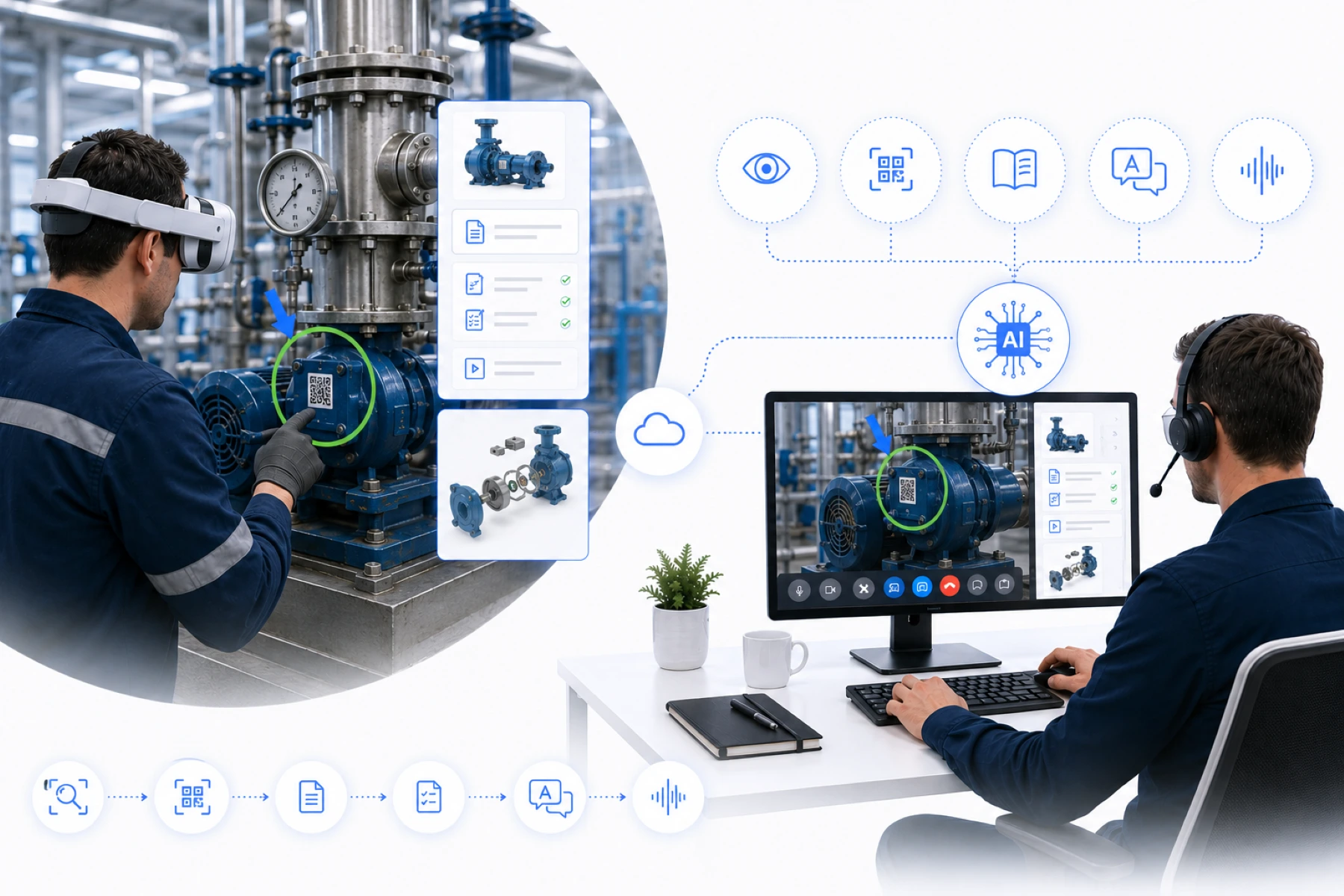
Spatial Support becomes even more powerful when AI is used as a supporting layer. Not as a separate technology next to the process, but as a way to recognise, translate and make information available faster during a live support moment.
In complex work situations, effective support is not only about watching along or pointing things out. The expert also needs to quickly understand what is visible, which information is relevant and which next step makes sense. AI can help by recognising context from the work environment and connecting it to the right documentation, instruction or workflow.
Think of object recognition through the camera of the VR headset, where components, installations or situations can be recognised automatically. QR or asset scanning can also be used to retrieve the right information immediately, such as technical documentation, maintenance history, checklists or product specifications. As a result, the on-site employee has to search less and the expert gains faster access to relevant information.
AI can also add value to the communication between expert and employee. Live voice translation makes support across language barriers easier. Voice commands can be used to start actions without the employee having to use their hands. Contextual AI can help make step-by-step instructions, manuals or procedures available at the right moment.
The key point is that AI within Spatial Support is applied purposefully. The value is not in AI as a general feature, but in making the right information available at the right time. Which AI applications are used depends on the customer environment, the available data and the purpose of the support.
When AI is connected to existing systems, data and workflows, support can become not only faster, but also more consistent and better informed. In this way, Spatial Support develops from visual remote support into contextual support. The expert remains in control, but gains better information, faster recognition and more ways to guide the employee effectively in the physical work environment.
What is Spatial Support used for?
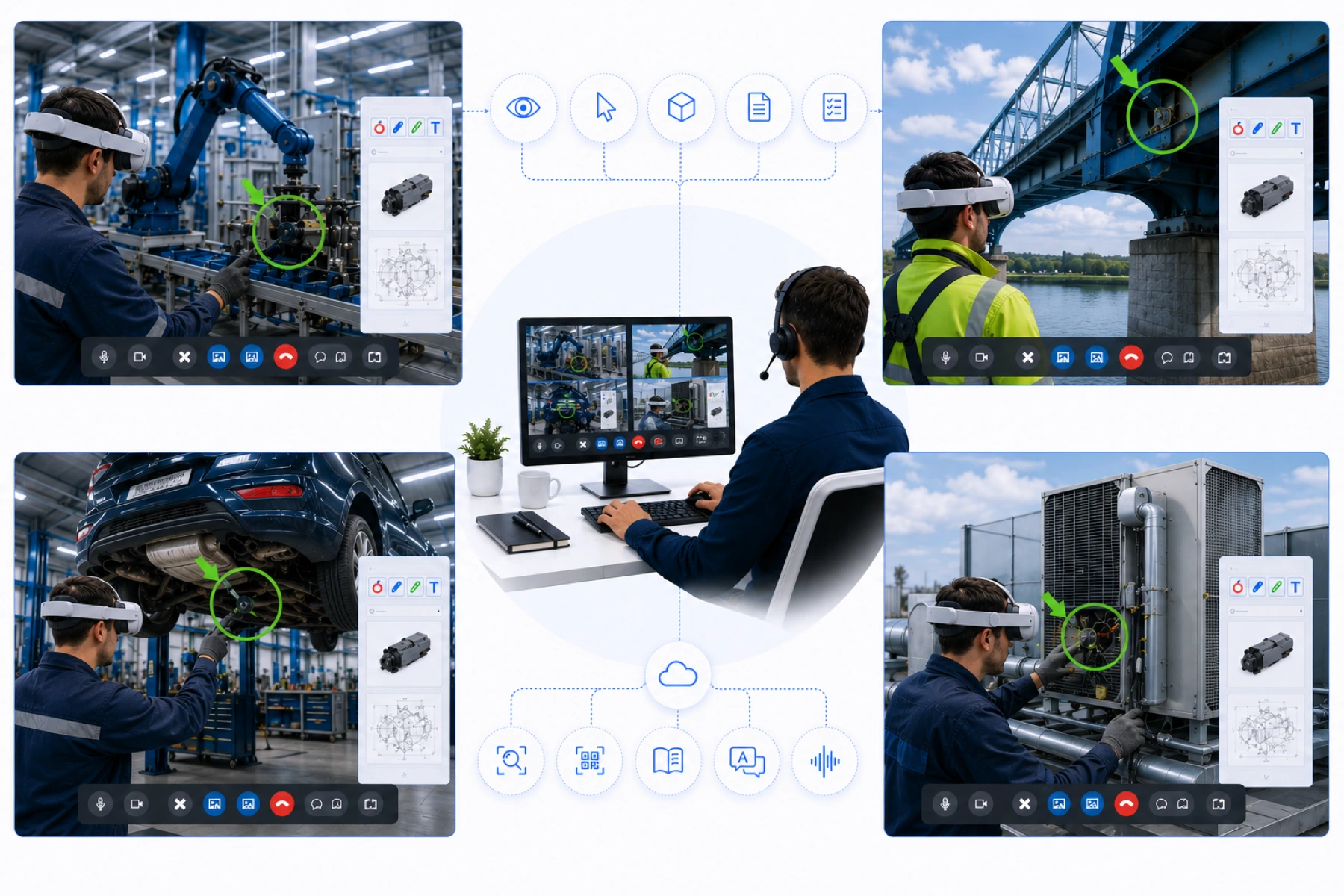
Spatial Support is especially valuable in situations where distance, complexity and scarce expertise come together. Many organisations depend on experienced specialists who cannot be everywhere at once, while technical processes are becoming more complex and new employees need to be onboarded faster.
With Spatial Support, that knowledge can be deployed remotely, without the expert having to travel physically to every location. This makes support faster, knowledge transfer more consistent and the use of experienced specialists more scalable.
Remote expert support for technical issues
When a fault or technical question arises, the right expert is not always available on location. With Spatial Support, a specialist can watch live through the VR headset of the on-site employee and directly indicate which component requires attention.
The expert clicks in the dashboard on the object or location in the live video stream. The employee then sees a pointer, circle or marker in their physical work environment. This makes expertise directly available where it is needed, without travel time or lengthy explanations.
Knowledge transfer during labour shortages
Many organisations rely on a limited group of experienced employees. These specialists have the knowledge, but not always the time to personally guide new colleagues at every location.
Spatial Support makes it possible to transfer that knowledge live during the work itself. A senior expert can guide a less experienced employee remotely, provide visual instructions, share technical diagrams and directly check whether the action is being carried out correctly.
This makes knowledge transfer less dependent on physical presence. New employees can learn faster in practice, while experienced experts are deployed more efficiently.
Maintenance, inspection and quality control
In maintenance and inspections, it is important that situations are assessed correctly. Spatial Support helps when an expert wants to remotely watch along with an installation, machine, technical room or work situation.
The expert can mark zones that require extra attention, show documentation, share technical diagrams and use spatial information to assess the situation more effectively. This makes inspections more concrete, easier to verify and less dependent on verbal explanation.
Installation and commissioning across multiple locations
During installation and commissioning, everything needs to be correct: components must be placed properly, connections must be made correctly and the situation must match the intended result.
Spatial Support helps guide these processes remotely. An expert can place 3D models in the field of view, show instructions and check live whether the execution is correct. This is especially valuable for organisations that carry out installations across multiple locations, but cannot deploy a specialist physically for every step.
These scenarios show that Spatial Support is not just a technological extension of remote support. It is a way to make expertise scalable in a market where experienced people are scarce, processes are becoming more complex and organisations need to act faster.
What is the difference between Spatial Support and traditional remote support?
The difference between Spatial Support and traditional remote support is not only about watching remotely. The real difference lies in how support is connected to the physical work environment of the on-site employee.
In many existing remote support solutions, the focus is on communication, watching along and giving explanations. This often happens through a smartphone, tablet, laptop or smartglasses. That can be valuable, but in complex work situations practical limitations arise. With smartphones and tablets, the employee has to hold the device, aim the camera or switch between the screen and the task. This makes support less natural when someone needs both hands to carry out the work.
Smartglasses do offer handsfree use and can be valuable for certain forms of remote support. However, they are often less suitable when support needs to be spatial, interactive and contextual across the full work situation. Spatial Support requires more than sharing video or communicating remotely. Support must be directly connected to the environment in which the employee is working.
This is where the strength of standalone VR headsets becomes clear. Through passthrough technology, the employee continues to see the physical environment, while visual instructions, technical diagrams, 3D models and other digital support can be added within the same work context. The employee keeps both hands free and receives support exactly where it is relevant.
Standalone VR headsets also provide more computing power, sensor technology and depth technology. This allows markers to be linked more accurately to objects, positions and distances in physical space. It also creates more room for advanced AI applications, such as object recognition, voice commands, live translation, QR or asset scanning and contextual support based on documentation or workflows.
This also changes the role of the expert. The expert does not only watch along, but can actively guide within the situation itself. They can mark a component, share technical information, place a 3D model or make AI-supported context available while the employee continues working.
For the employee, this means less searching, less doubt and less dependence on verbal explanation. They do not only see what the expert means, but also where it is relevant. More importantly, they can keep working without needing their hands for the support device itself.
Traditional remote support makes expertise available remotely. Spatial Support makes that expertise visible, spatial, interactive and directly applicable in the physical work environment.
Why Spatial Support is becoming important for organisations
Spatial Support is becoming important for organisations because the pressure on technical expertise is increasing. Installations are becoming more complex, experienced specialists are scarce and support needs to be available faster. At the same time, it is not efficient to send experts physically to a location for every question, inspection or technical task.
Traditional remote support helps make expertise available remotely, but it does not always solve the core problem. In complex situations, an on-site employee does not only need to hear what to do, but must immediately understand where, how and in which sequence to act. That is where the value of Spatial Support emerges.
With Spatial Support, an expert can deploy their knowledge at scale without being physically present everywhere. One specialist can guide employees across multiple locations, place visual instructions, share technical information and provide support within the context of the work itself. This makes organisations less dependent on travel time, local availability and verbal explanation.
For companies facing labour shortages, this is especially relevant. Experienced employees can transfer their knowledge to less experienced colleagues while they work in practice. New employees learn faster, operational teams receive better support and senior experts are deployed more selectively where their knowledge truly adds value.
The quality of execution can also improve. Because instructions are made visual and spatial, there is less room for interpretation. The on-site employee understands more clearly what is meant and the expert can more precisely verify whether an action is being carried out correctly. This helps reduce errors, delays and unnecessary repeat visits.
Spatial Support is therefore not only a technological improvement of remote support, but above all a strategic way to organise knowledge, capacity and execution more effectively. In a market where expertise is scarce and processes are becoming more complex, that difference becomes increasingly important.
XeeXR Spatial Support
XeeXR Spatial Support has been developed from one clear vision: remote support should not only be technically possible, but above all workable in practice. The foundation of the platform is in place. The live connection, the headset experience, the browser-based dashboard, spatial support and the technical foundations are ready. The real value emerges when this foundation is configured around the customer’s work situation.
That is why XeeXR Spatial Support is not a standard tool that works the same way for every organisation. Every organisation has its own processes, systems, data and operational challenges. Through co-creation, we configure the platform in a targeted way: with the right functions, workflows, information and method of guidance.
The strength of XeeXR is not in overloading the on-site employee with as many functions as possible. Quite the opposite. The employee in the field must be able to work safely, maintain overview and only see what is relevant at that moment. The complexity should not sit inside the headset, but in the browser-based dashboard where the expert controls the session.
That browser dashboard forms the central layer of XeeXR Spatial Support. From the browser, the expert starts and manages sessions, watches live, places instructions, shares information and controls the guidance. On the expert side, no desktop version or local software installation is required. Support can be received via laptop, desktop, tablet, smartphone or VR headset, depending on the situation.
XeeXR also remains flexible on the side of the on-site employee. Standalone VR headsets form the most powerful foundation for Spatial Support, but combinations with other devices are possible when practice requires it. This means the platform is not tied to one device or one fixed way of working. XeeXR is organised around the customer’s process, not the other way around.
The same approach applies to AI and integrations. AI within XeeXR is not a generic feature, but a custom layer that must add value to the support process. Think of live translation, voice commands, object recognition, asset scanning, document connections or contextual support based on existing workflows. Integrations with existing platforms, support systems, document environments or enterprise workflows can also be configured when they strengthen the practical application.
What sets XeeXR Spatial Support apart is the combination of years of experience in XR, browser technology, real-time communication and interactive 3D software. GOTOVIAR has brought this knowledge together in its own platform that makes Spatial Support practically deployable. There are many forms of remote support worldwide, but the combination of browser-based control, standalone VR headsets, spatial support, device flexibility, AI and customer-specific co-creation is exceptional. That combination is what makes XeeXR Spatial Support distinctive.
XeeXR Spatial Support is therefore not a traditional remote support tool and not a one-off demo. It is an advanced technology platform for organisations that want to use expertise more effectively, bring digital support closer to execution and connect processes more intelligently.
The essence is simple: the on-site employee remains focused on the work, the expert stays in control from the browser dashboard and the organisation gains a scalable way to bring knowledge, support and execution together. That is the strength of XeeXR Spatial Support.
More information about XeeXR Spatial Support
The future of remote support is spatial: spatial, contextual and directly applicable
Remote support remains important, but the way organisations organise support at a distance is changing. Simply watching along or explaining is no longer enough when processes become more complex, expertise becomes scarcer and on-site employees need to act correctly faster.
The next step is support that is directly connected to the employee’s work environment. Instructions are no longer separate from the situation, but become visible exactly where they are needed. Expertise is not only shared, but made spatially applicable.
That is what Spatial Support stands for. It brings live guidance, visual instructions, contextual information and spatial interaction together in one way of working. Not to make remote support more complex, but to make support clearer, faster and easier to execute.
The future of remote support is therefore not about watching better. It is about guiding better. And that guidance becomes spatial.
Frequently asked questions about Spatial Support
What is Spatial Support?
Spatial Support is a form of remote support in which experts guide on-site employees with visual and spatial support in the physical work environment. Instead of only watching along or giving explanations, an expert can connect instructions, information or digital content to the place where action is needed.
How does Spatial Support work?
Spatial Support works through a live connection between an on-site employee and a remote expert. The employee wears a standalone VR headset and remains handsfree while working in their physical work environment. The expert watches live through a browser-based dashboard and can add visual instructions, technical information, 3D models or other support to what the employee sees.
What is the difference between Spatial Support and traditional remote support?
Traditional remote support makes expertise available remotely through communication, video and explanation. Spatial Support goes further by making that expertise visible, spatial and directly applicable in the physical work environment.
Why are standalone VR headsets suitable for Spatial Support?
Standalone VR headsets combine passthrough technology, handsfree working, sensor technology, depth technology and computing power. This allows the employee to keep seeing the physical work environment while visual support is added in the right place.
What makes XeeXR Spatial Support different?
XeeXR Spatial Support combines a browser-based dashboard, standalone VR headsets, spatial support, device flexibility, AI capabilities and customer-specific co-creation. The on-site employee remains focused on the work, while the expert centrally controls the support from the browser dashboard.
Discover what Spatial Support can mean for your organisation
Do you want to deploy expertise faster, reduce errors and guide on-site employees more effectively?
With XeeXR Spatial Support, the technological foundation is already in place. Through co-creation, we configure a workable solution together that aligns with your processes, workflows and operational practice.
Get in touch and discover how Spatial Support can be configured for your organisation.