

XeeXR Spatial Support
When remote viewing is no longer enough
Remote support has made organizations faster and more efficient by making expertise available at a distance. In a time of workforce shortages and increasing technical complexity, effective knowledge transfer is becoming increasingly important.
This is exactly where traditional remote support reaches its practical limit. Simply viewing and explaining is not always enough. In technical, complex, or time-critical situations, information must not only be shared, but understood immediately and executed correctly.
XeeXR breaks through this limitation with Spatial Support via standalone VR headsets. The expert follows along live through a browser-based dashboard and guides the user directly within the physical environment they see through the VR headset. Visual guidance appears exactly where action is required.
This changes remote support from explanation at a distance into direct support in practice. Less interpretation, fewer errors, and better use of scarce expertise.
The power of the VR headset
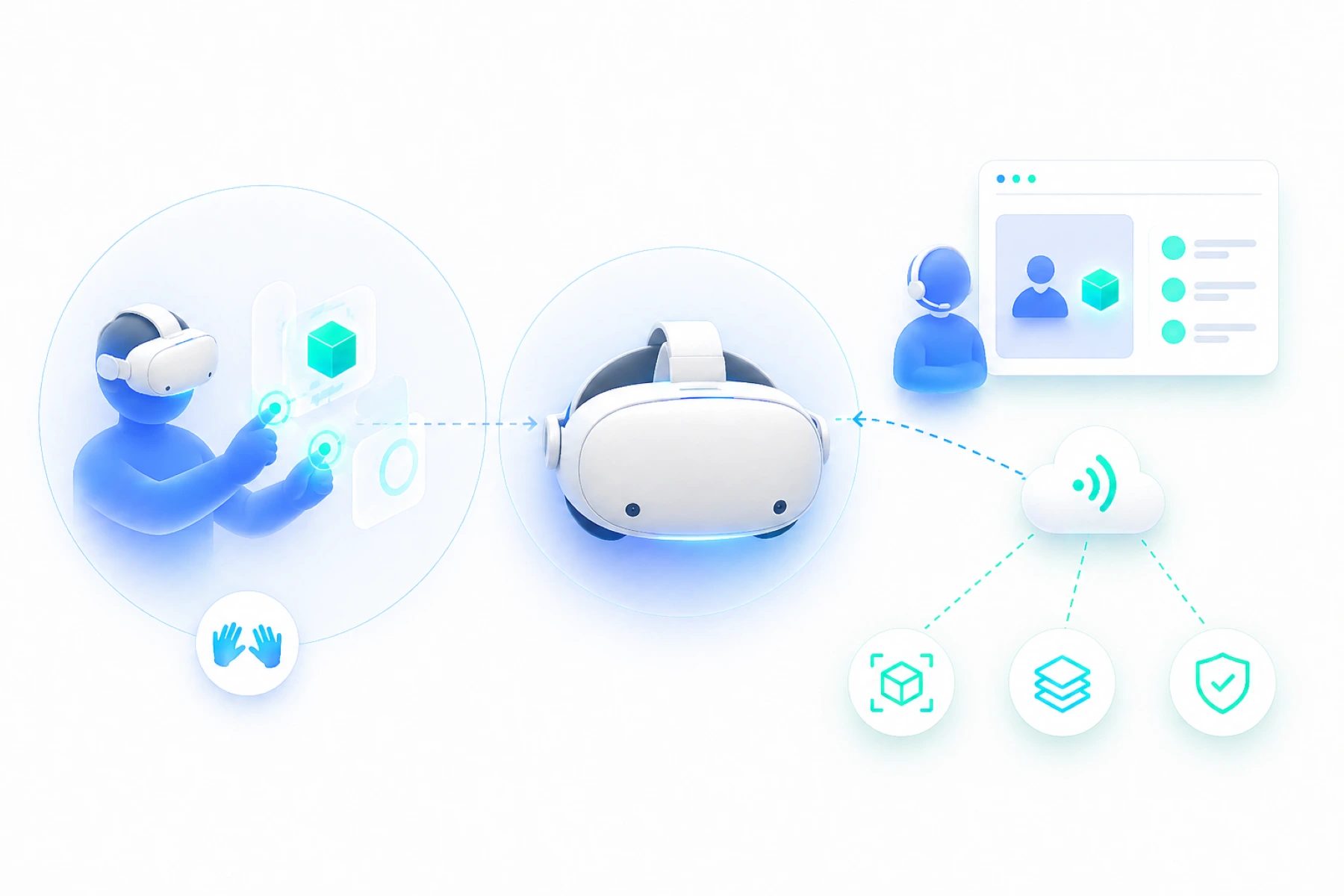
Within Spatial Support, the standalone VR headset forms the core of the experience. Not as an extra layer, but as the foundation for direct support in practice.
Where traditional devices are often limited to viewing and communication, the VR headset makes it possible to connect support directly to the real world. The user does not look at a screen, but works in their own environment while visual guidance appears exactly where action is required.
The VR headset also provides the processing power needed to make this interaction real-time and stable. Visual layers, context, and interaction come together without compromising the user’s experience.
A key advantage is that the user can work fully hands-free. In situations where safety, precision, or speed are critical, this is essential. Thanks to hand tracking, interaction feels natural, without depending on controllers or additional actions.
At the same time, the user experience remains deliberately simple. No complex menus or distractions, only the essential actions needed to start and follow a session. The intelligence and control sit with the expert in the browser-based dashboard.
This creates a clear division of roles. The user carries out the work in practice, while the expert guides and directs remotely. That makes the VR headset not only powerful, but above all effective in daily use.
The browser-based dashboard
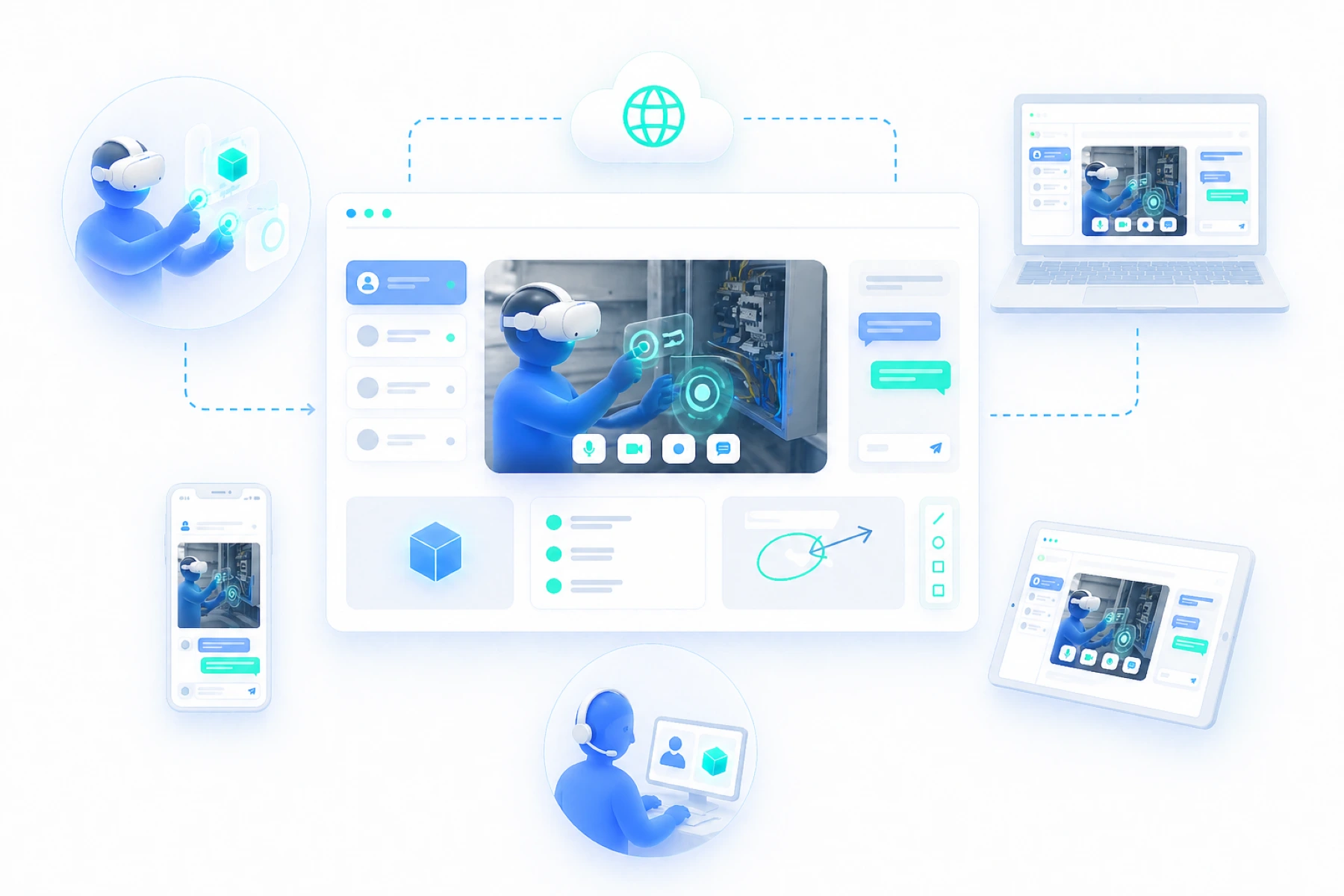
Within Spatial Support, control is centralized in the browser-based dashboard. This is the environment where the expert works, manages sessions, and actively guides the user.
The dashboard runs entirely in the browser and requires no installation. Whether you work from a laptop, desktop, tablet, smartphone, or even a VR headset, access is immediately available. This makes it easy to start quickly, scale up, and organize support without depending on local software or specific systems.
Through the dashboard, the expert receives the live stream from the VR headset and gains direct insight into the situation. From the same environment, sessions can be started and managed. Interaction with the user also comes together here, from visual guidance and shared content to real-time support during actions.
This makes the dashboard the central control layer of Spatial Support. One place where overview, control, and collaboration come together.
Live annotations in the physical environment
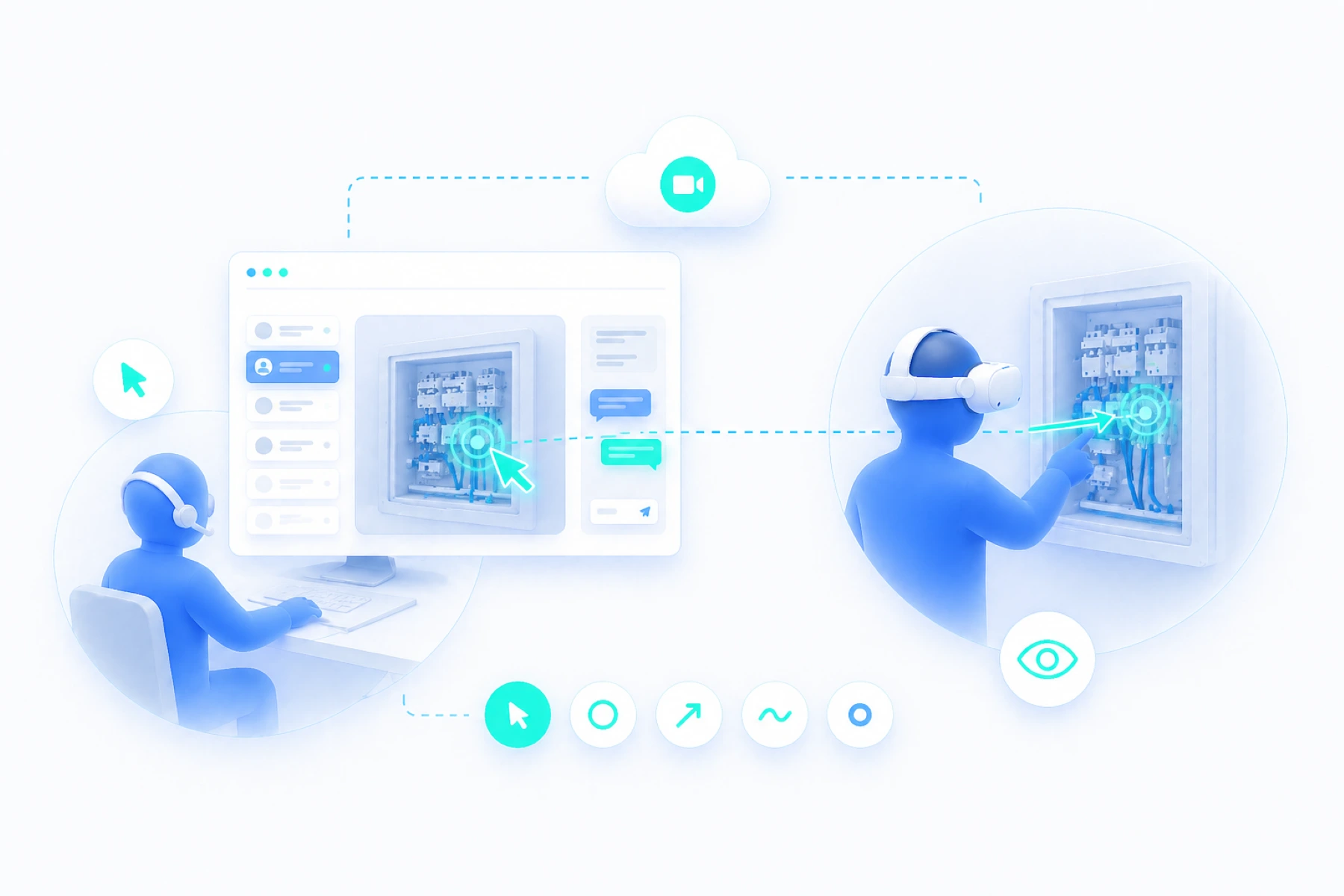
With Spatial Support, the expert works directly within the user’s live situation. Through the browser dashboard, the expert sees the real-time video stream from the VR headset and can act immediately within the image being received at that moment.
The expert clicks directly in the live stream using the mouse. Not on a screenshot or still image, but on the actual situation as the user sees it in that moment.
That click is translated directly into the user’s physical environment. In the VR headset, the instruction appears exactly where the expert clicked. As if someone were standing on site, pointing out where action is needed.
Thanks to the headset’s depth technology, instructions are spatially placed and linked to the correct position in the environment. Arrows, circles, markers, and other visual instructions therefore remain visible in the right place, even when the user moves.
This changes remote support from explanation into direct visual guidance. Not telling someone where to look, but showing exactly what needs to happen.
3D models in reality
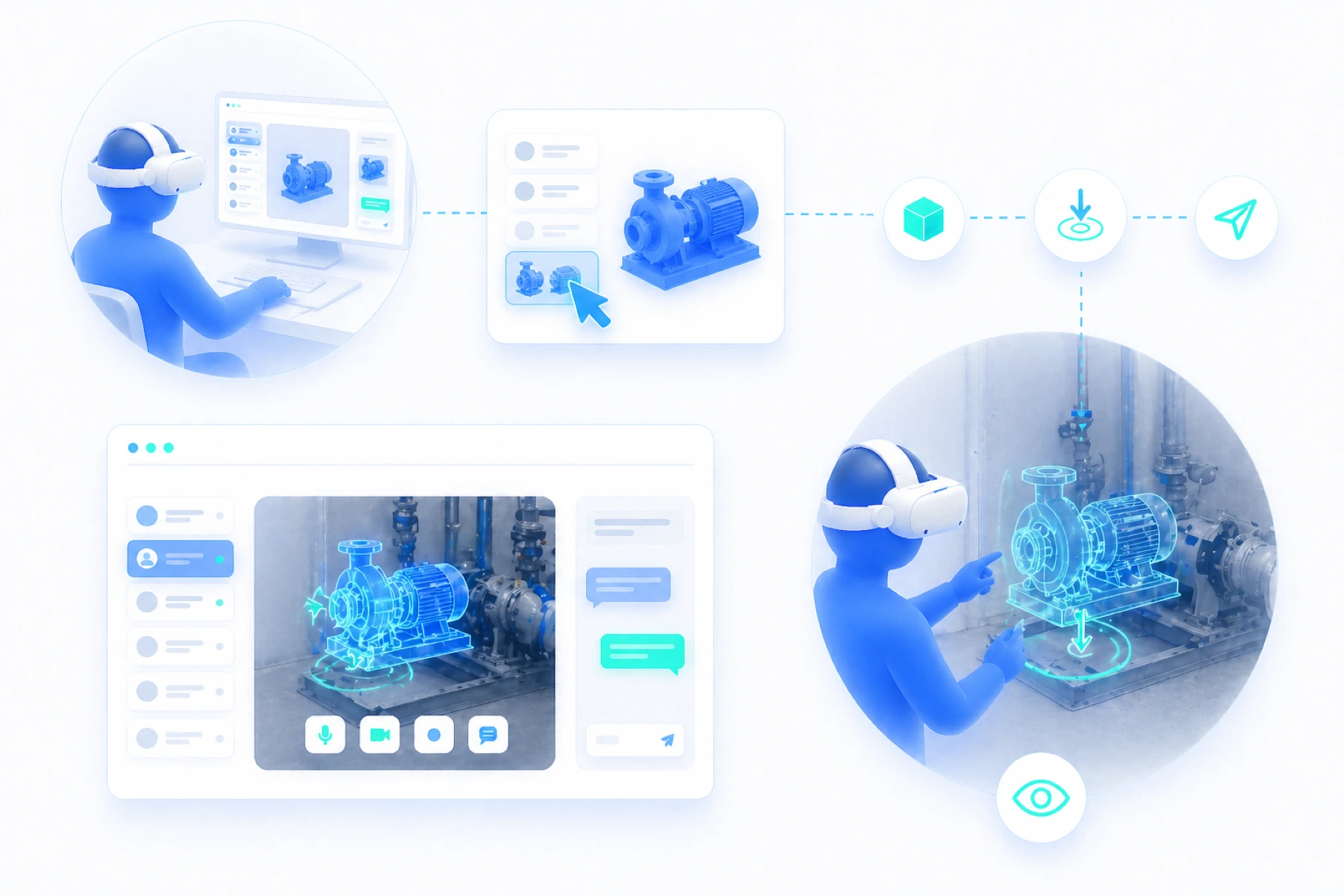
With Spatial Support, the expert can do more than point things out. From the browser dashboard, 3D models from a prebuilt library can be placed directly into the user’s physical environment.
The expert selects the right model and positions it live in the stream. In the VR headset, the model then appears in that exact position in reality. This makes it immediately visible how something should be placed, where a component belongs, or whether the situation matches the intended result.
This makes it possible to check installations in advance, position components accurately, and compare reality with technical expectations. Instead of explaining how something should be, it becomes visible in the environment itself.
This makes guidance not only clearer, but also more controllable and more consistent in execution.
Desktop sharing in the VR headset
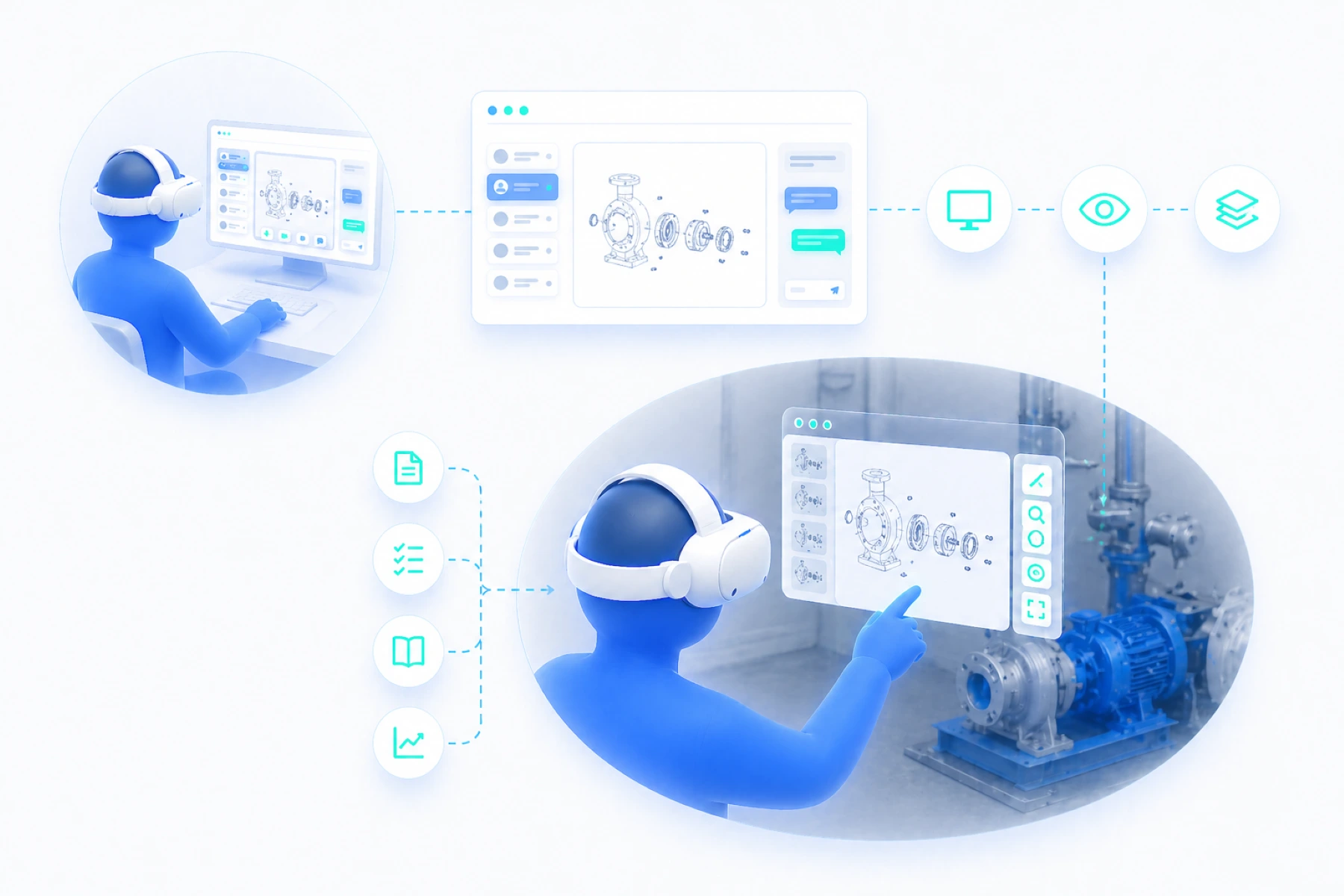
The expert can share their desktop screen with the user in the VR headset directly from the browser dashboard. This can include technical diagrams, manuals, checklists, documentation, or live data needed at that moment to carry out an action correctly.
The user sees this information as a separate layer within the headset’s field of view. The physical environment remains visible, while relevant information is immediately available in the same work context. There is no need to switch between separate screens, paper documents, or other devices.
This makes remote support more concrete and more efficient. The expert does not only have to explain information, but can show it directly at the moment the user needs it.
Measurements and spatial insight
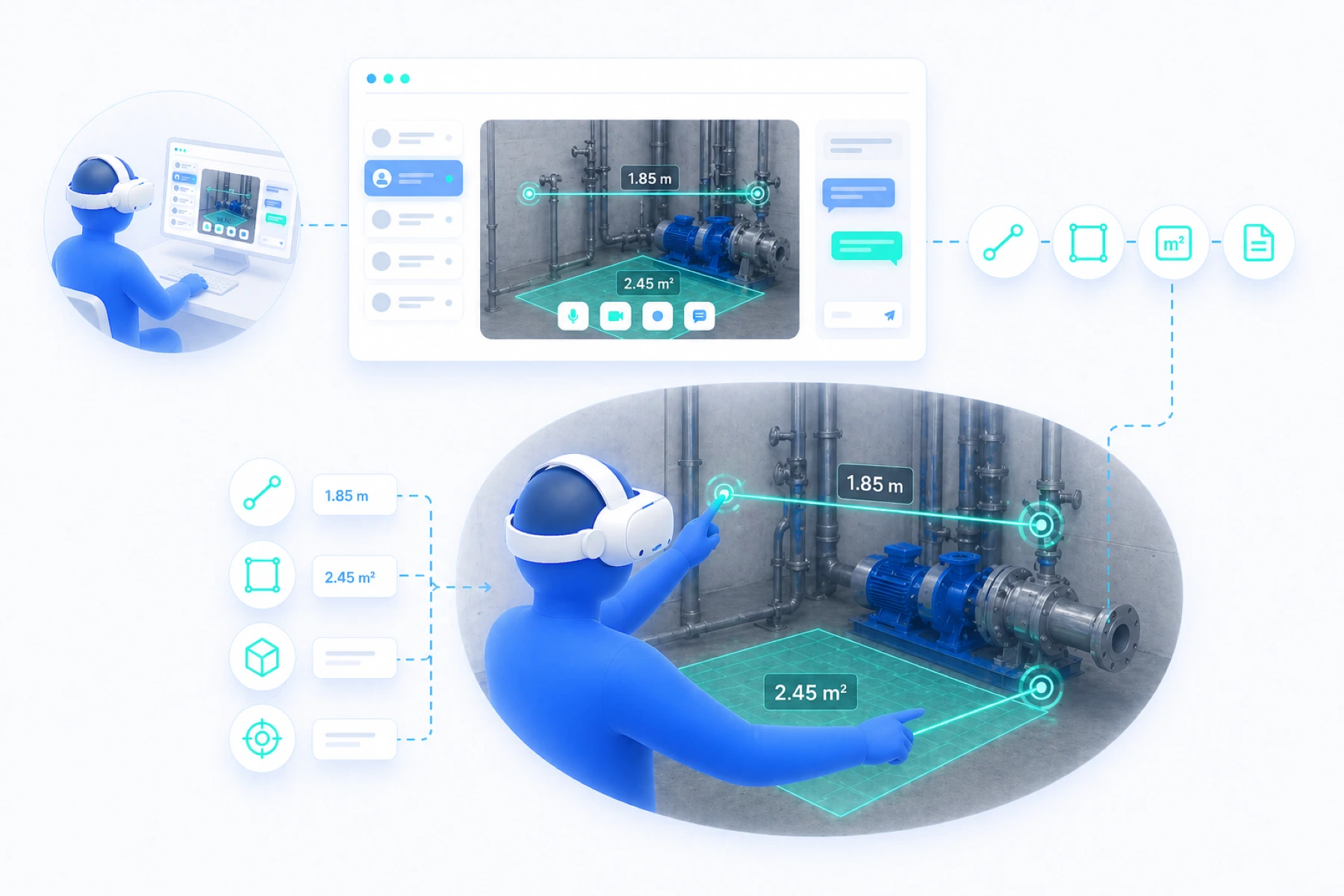
With Spatial Support, the physical environment can also be made measurable. By using the depth technology of the VR headset, spatial information becomes directly available during a live session.
From the browser dashboard, or directly in the VR headset, a start and end point can be selected in the physical environment. Based on this, distances can be calculated, and surfaces such as square meters can also be made visible.
This means situations can not only be assessed visually, but also supported with concrete data. Think of checking available space, verifying placements, and accurately estimating dimensions. This data can be used as a basis for quotations, preparation, and technical decisions.
As a result, remote support becomes not only insightful, but also measurable and directly applicable within the process.
AI as a supporting layer
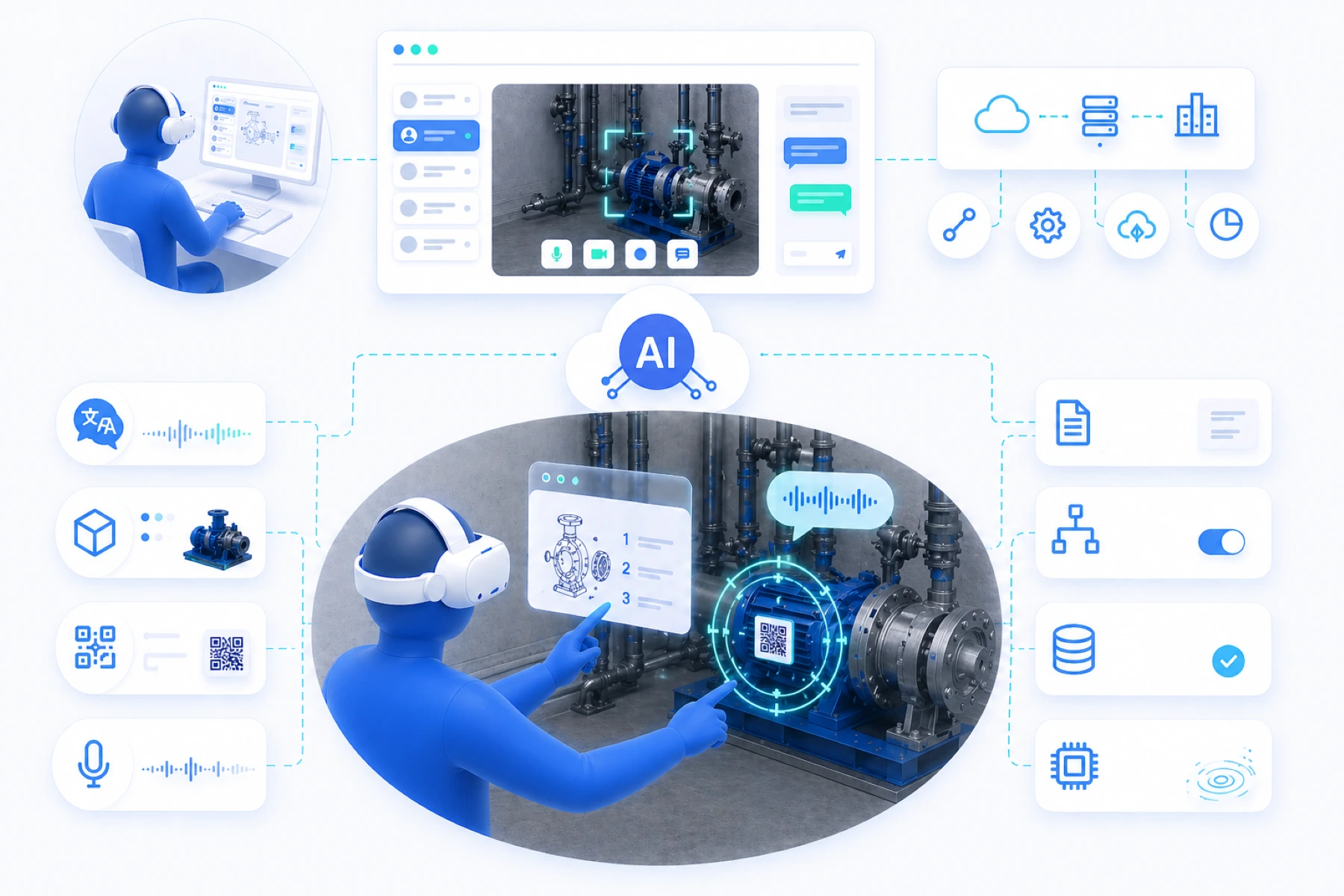
AI can strengthen Spatial Support by making information faster to recognize, access, and apply during a live session. Not as a separate gimmick, but as a practical support layer that helps the expert and user move more quickly toward the right action.
Depending on the application, AI can be deployed in the cloud, in a hybrid model, or partly locally on the VR headset. This is an important advantage of standalone VR headsets. With greater storage capacity and stronger processing power, certain processes can be performed locally without making everything fully dependent on external processing.
Think of live voice translation during conversations, object recognition through the camera, QR or asset scanning to retrieve relevant data, voice commands for simple actions, and contextual support with manuals, step-by-step instructions, or technical documentation.
AI triggers can also be connected to existing systems. When an object, code, or situation is recognized, the right information can be opened automatically, a workflow can be started, or data can be forwarded to a connected platform.
The right AI application always depends on the objective, the available data, and the organization’s way of working. That is why we approach AI within XeeXR not as a standard feature, but as a custom layer configured around real-world practice.
Hardware flexibility
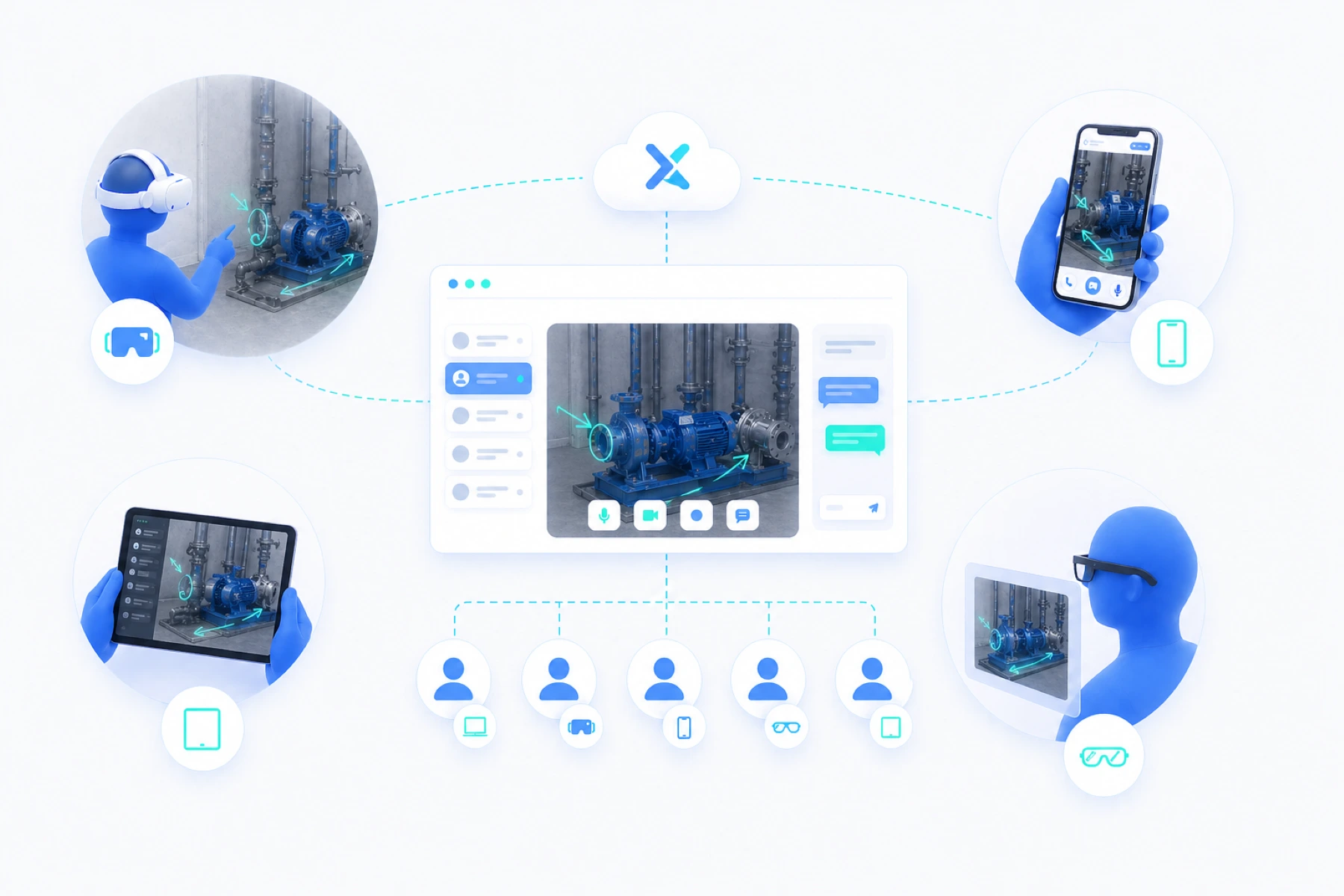
Within Spatial Support, standalone VR headsets are the core, because they bring together the greatest capabilities for visual support, interaction, and performance. At the same time, XeeXR is developed as a platform that can be adapted to different work situations and devices.
Depending on the use case, smartphones, tablets, and smartglasses can also be used. For simple situations, quickly sharing a view may be sufficient. In more complex environments, the VR headset provides more context, precision, and interaction.
The platform also supports combinations of devices. An expert can work from the browser dashboard, while users in different locations are connected through different devices. This creates flexibility without fragmenting collaboration.
One platform, multiple devices, deployed according to the situation. That makes Spatial Support scalable and applicable across a wide range of processes and environments.
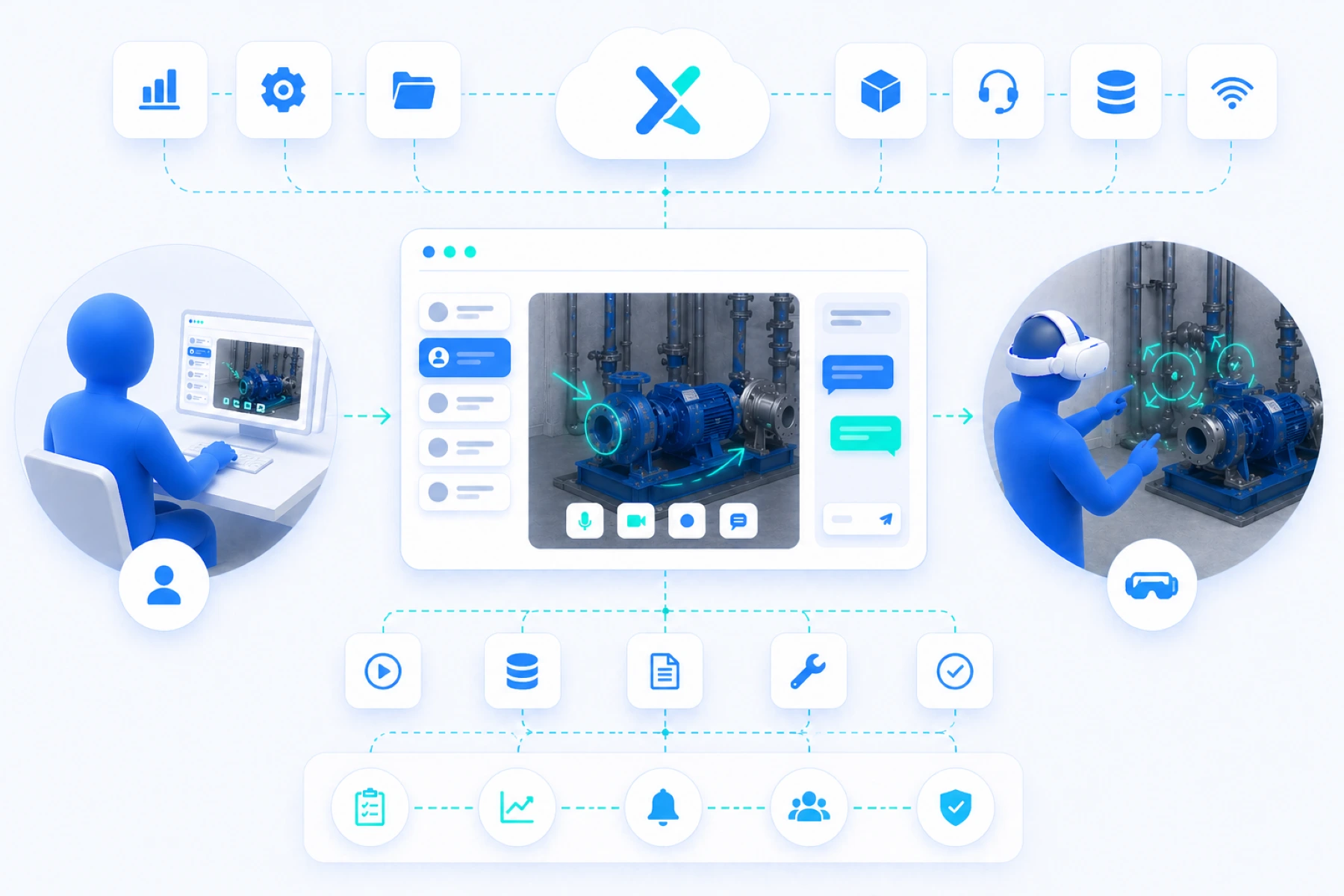
Integrations and ecosystems
Spatial Support can be integrated into existing digital environments when the situation requires it. Think of connections with ERP, maintenance platforms, document management, or support tools, making information and workflows available within the context of the work.
These integrations always require analysis and alignment. Every organization works with its own processes, data flows, and systems. That is why XeeXR does not work from standard plug-ins, but from targeted integrations that fit real-world practice and add measurable value.
An internal initiative is currently underway around a support hub in an IBM context. This explores how Spatial Support can be connected to existing systems, support processes, and enterprise workflows. These types of projects show how the platform can connect to broader ecosystems.
This keeps Spatial Support flexible as a standalone solution, with the option to integrate where needed.
Performance that matters in practice
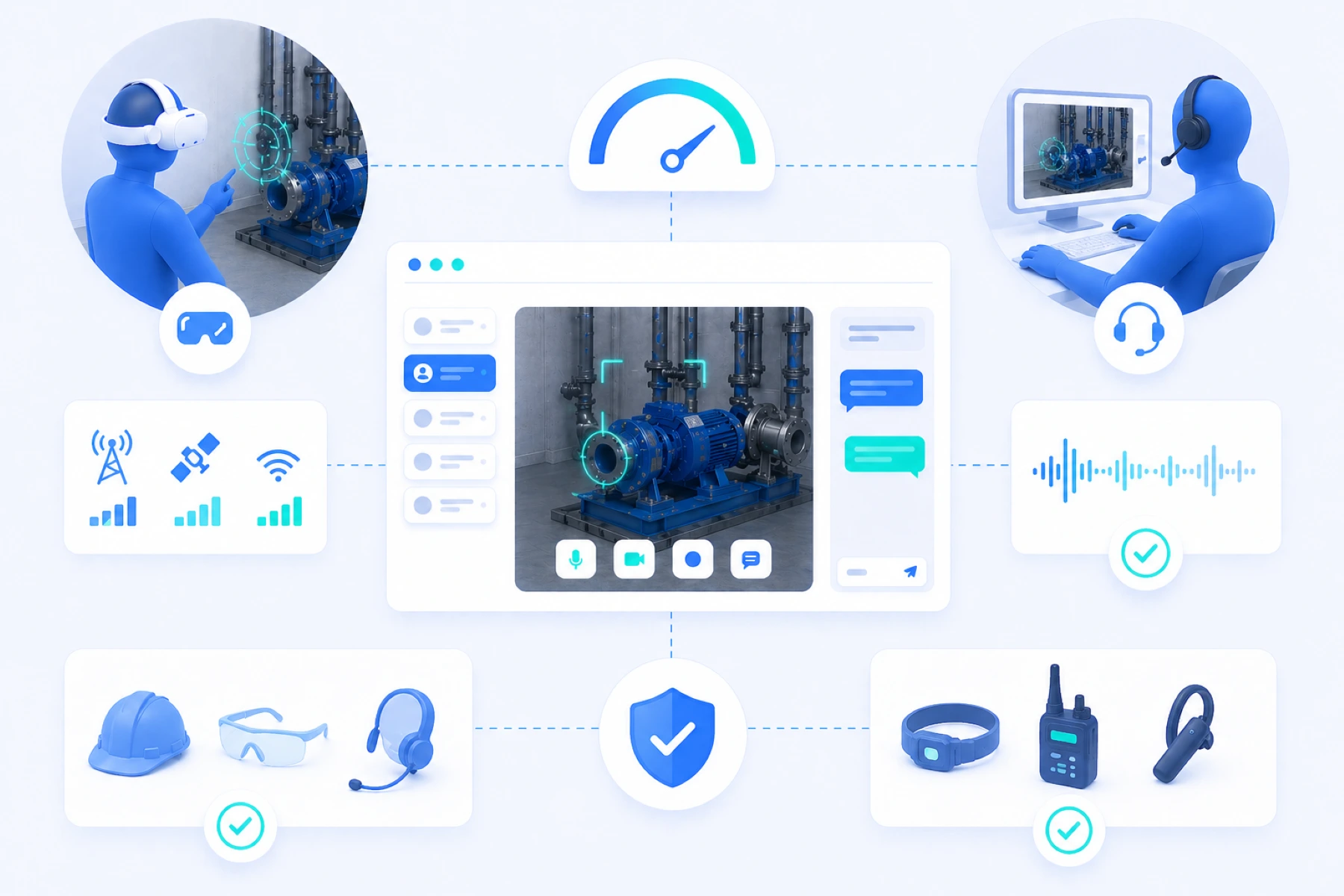
Spatial Support depends on performance. In practice, this means a live experience that feels immediate, remains clear, and works reliably when it is needed.
The video stream from the VR headset is sent to the browser dashboard in high clarity. Movements are followed smoothly and the expert can respond directly, without noticeable delay. Audio communication is also stable and clear, allowing instructions to flow naturally and without interruption.
Connection quality plays an important role in this. Not only bandwidth, but especially stability, determines the experience. That is why we actively test with different network conditions, including mobile networks and solutions such as Starlink, to achieve consistent performance even in challenging environments.
In many situations, additional accessories can also be used, such as safety equipment or communication solutions, without compromising the system’s operation or performance.
This keeps Spatial Support not only technically strong, but above all reliably deployable in the real-world environments where it truly needs to perform.
Our approach
Developed in co-creation and aligned with real-world practice
Spatial Support is not a standard solution that is rolled out in the same way everywhere. Every organization has its own processes, work environments, safety rules, and preferences for remote support.
That is why we develop Spatial Support in co-creation with the organization. We start with an analysis of the use case, workflow, and technical environment. From there, we work through a proof of concept toward a solution that is tested, improved, and refined step by step.
This iterative approach ensures that the technology aligns with how people actually work. From interface and functionality to devices, data, integrations, and workflows. The browser dashboard can also be adapted, including a custom or white-label version that fits the organization and its users.
This creates not a generic tool, but a solution that fits the organization and works reliably in the environment it is designed for.
Get in Touch
Discover what Spatial Support can mean for your organization
Would you like to experience how XeeXR changes remote support from viewing along to direct guidance in practice? Schedule a demo, start a pilot, or get in touch for an initial exploration.
Together, we identify which use case delivers the most value, which workflow fits your organization, and how Spatial Support can connect to existing processes.
Schedule a demo or get in touch.